Build a freezer and fridge alarm with an ESP32
Disclosure: As an Amazon Associate I earn from qualifying purchases. Links to parts on this page are affiliate links, some through brand partnerships, so I may earn a commission at no extra cost to you. It never changes which parts I recommend.
A tripped breaker, a door that didn't latch, or a compressor on its way out can spoil hundreds of dollars of food before anyone notices. This monitor watches the temperature in both compartments and both doors, and warns your phone long before anything thaws.
- Cost
- $15–25
- Time
- 1 hour
- Difficulty
- Beginner
- Skills
- Simple wiring
What it watches
- Temperature in each compartment, using waterproof DS18B20 probes.
- Each door, using magnetic contacts, so you hear about a door left ajar in minutes rather than hours.
- Power. The ESP32 plugs into the same outlet as the appliance, so if the monitor drops offline, the freezer has probably lost power too.
Parts
- An ESP32 DevKit and a USB power supply.
- Two waterproof DS18B20 probes, one per compartment.
- Two magnetic door contacts, the wired kind sold for alarm systems.
- Two 4.7 kΩ resistors, one pull-up for each probe.
- A small enclosure to stick on the side or top of the fridge.
- ESP32 DevKitView on AmazonPhoto: Edwiyanto, CC BY-SA 4.0

- DS18B20 waterproof probeView on AmazonPhoto: Leonardo Postay, CC BY-SA 4.0

- Magnetic reed switchView on AmazonPhoto: André Karwath, CC BY-SA 2.5

- Resistor assortmentView on AmazonPhoto: Afrank99, CC BY-SA 2.5

- 5 V USB power supplyView on AmazonPhoto: Сергей Михель, CC BY-SA 3.0

- Plastic project enclosureIllustration
Wiring
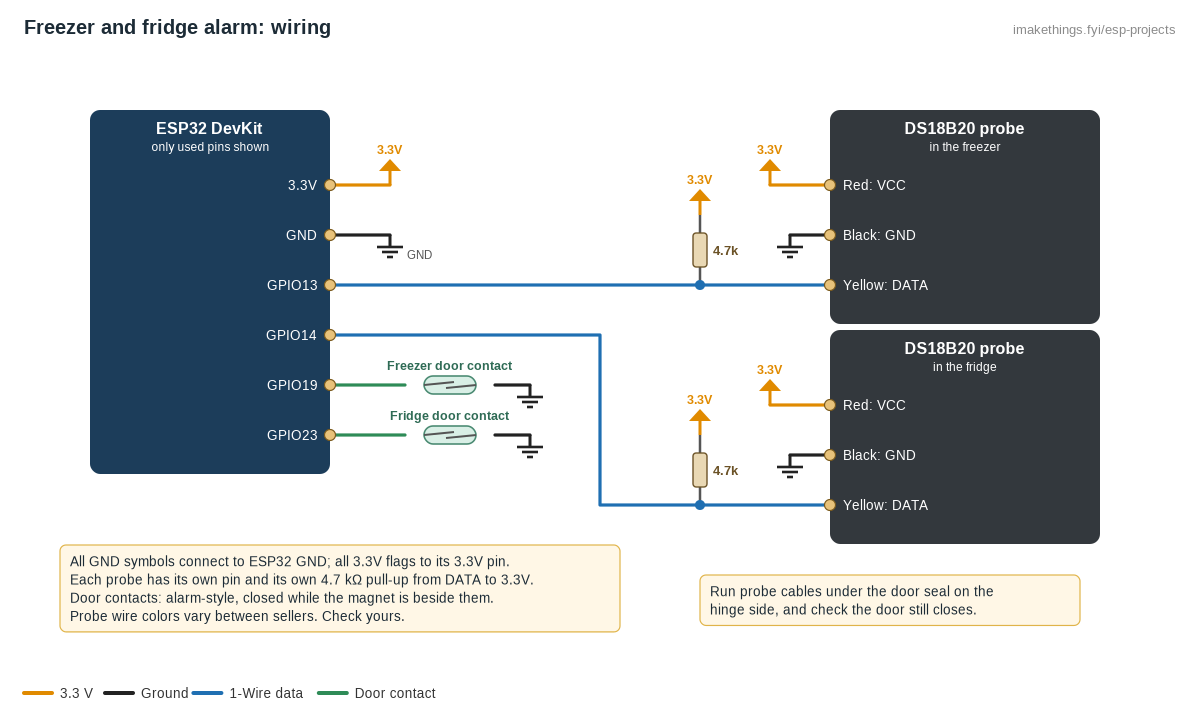
| Part | Wire | ESP32 |
|---|---|---|
| Freezer probe | Red / black / yellow | 3.3V / GND / GPIO13 |
| Fridge probe | Red / black / yellow | 3.3V / GND / GPIO14 |
| 4.7 kΩ resistors | From each probe's yellow (data) wire to 3.3V | |
| Freezer door contact | Either wire | GPIO19 and GND |
| Fridge door contact | Either wire | GPIO23 and GND |
Each probe gets its own pin, so there's no need to look up the probes' serial numbers. Wire colors vary between sellers; check yours against the listing if they don't match.
Getting the probe inside
The probe cable is thin enough to pass under the door gasket. Run it on the hinge side, where the seal is squeezed least, and check the door still closes with a light push. Hang the probe in the air near the middle of the compartment rather than touching the back wall, the food, or the cooling vents.
Build this config in the generator
The ESPHome config
one_wire:
  - platform: gpio
    id: freezer_bus
    pin: GPIO13
  - platform: gpio
    id: fridge_bus
    pin: GPIO14

sensor:
  - platform: dallas_temp
    one_wire_id: freezer_bus
    name: "Freezer temperature"
    update_interval: 30s
  - platform: dallas_temp
    one_wire_id: fridge_bus
    name: "Fridge temperature"
    update_interval: 30s

binary_sensor:
  - platform: gpio
    name: "Freezer door"
    device_class: door
    pin:
      number: GPIO19
      mode:
        input: true
        pullup: true
    filters:
      - delayed_on_off: 100ms
  - platform: gpio
    name: "Fridge door"
    device_class: door
    pin:
      number: GPIO23
      mode:
        input: true
        pullup: true
    filters:
      - delayed_on_off: 100ms
The temperatures that matter
The FDA recommends keeping the freezer at 0 °F (−18 °C) or colder and the fridge at 40 °F (4 °C) or colder. Both swing a few degrees during defrost cycles and every time the door opens, so alerts need a delay, not just a threshold.
Home Assistant alerts
- Freezer warming: notify when Freezer temperature stays above 10 °F (−12 °C) for 30 minutes.
- Fridge warming: notify when Fridge temperature stays above 41 °F (5 °C) for 30 minutes.
- Door left open: notify when either door has been open for 2 minutes.
- Power or monitor lost: notify when the temperature sensors become unavailable for 10 minutes. For this to reach you during a power cut, Home Assistant and your router need a battery backup.
After an outage
The history graph is the useful part after a power cut: it shows how warm each compartment got and for how long. USDA guidance is that a closed fridge keeps food safe for about 4 hours without power, and a full freezer holds its temperature for about 48 hours (24 if half full). When in doubt, throw it out.
Going further
- Add a buzzer from the config generator for a local alarm that works even if Wi-Fi is down.
- A chest freezer in the garage is the classic candidate. Add a third probe there; the generator supports up to four.
Frequently asked questions
At what temperature should a freezer alarm go off?
A freezer should stay at 0 °F (−18 °C). A good alert is the freezer staying above 10 °F (−12 °C) for 30 minutes, and the fridge staying above 41 °F (5 °C) for 30 minutes.
Why does my DS18B20 read 85 °C or −127 °C?
85 °C is the sensor's power-on value, not a real reading, usually from a power dip. −127 °C means the ESP32 can't talk to it: check the 4.7 kΩ pull-up, the wiring and the data pin.
Can the freezer alarm tell me if the door was left open?
Yes. A magnetic door contact on each door reports open or closed, and Home Assistant can alert you when a door stays open for a few minutes.
Troubleshooting
| Symptom | Likely cause and fix |
|---|---|
| Probe reads 85 °C | A power-on value, not a real reading. Usually a power dip during conversion; check the 3.3 V wiring. |
| Probe reads -127 °C or is missing | A communication error: missing 4.7 kΩ pull-up, a broken wire, or DATA on the wrong pin. |
| Readings drop out at the door | The door seal is crushing the cable. Run it along the hinge side. |
| False alarms after a defrost cycle | Defrost heats the freezer briefly. Require the temperature to stay high for 30 minutes or more. |
| Door alert never clears | The magnet sits too far from the contact. Move it within about 1 cm when shut. |