Build a smart sprinkler controller with an ESP32 and ESPHome
Disclosure: As an Amazon Associate I earn from qualifying purchases. Links to parts on this page are affiliate links, some through brand partnerships, so I may earn a commission at no extra cost to you. It never changes which parts I recommend.
Replace a dumb irrigation timer with an ESP32 and a relay board, and let Home Assistant skip watering when it has rained or the soil is already wet. ESPHome's built-in sprinkler controller handles the zone sequencing, so it keeps working even if Home Assistant is down.
- Cost
- $25–40
- Time
- 2 hours
- Difficulty
- Intermediate
- Skills
- 24 V AC wiring
How residential sprinklers are wired
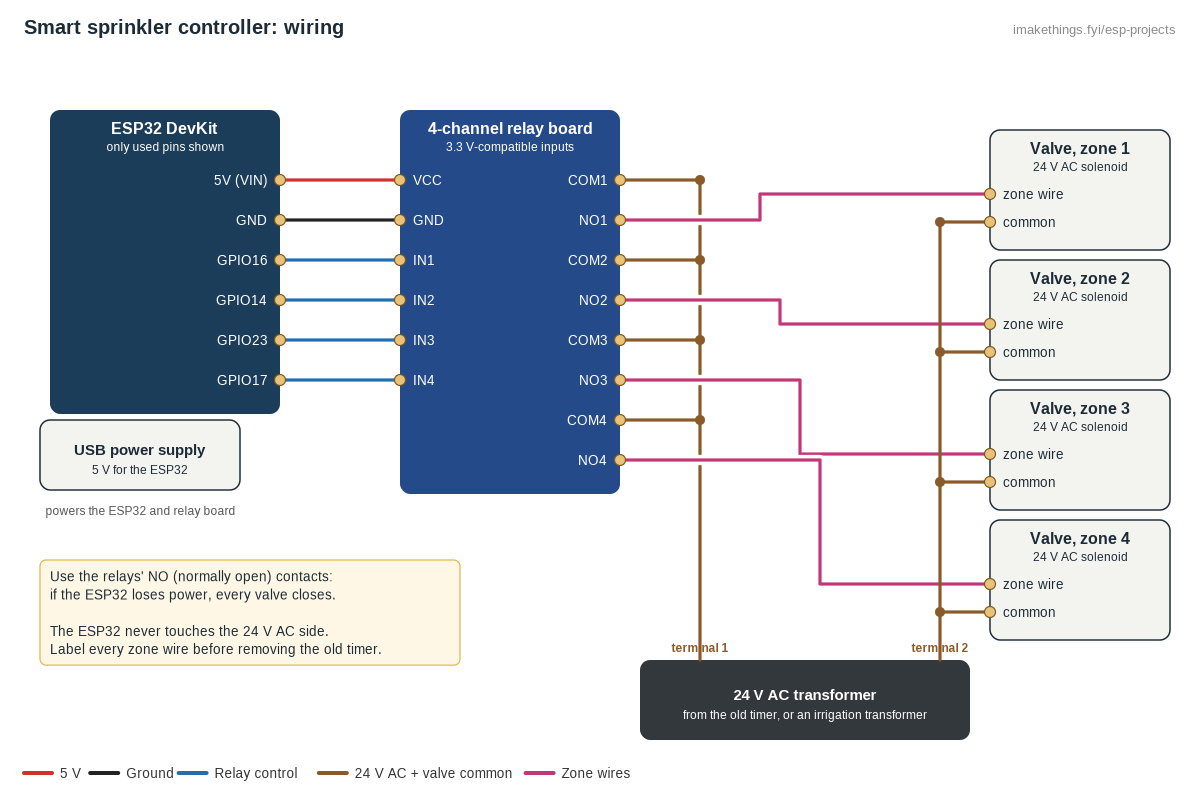
Almost all home irrigation valves are 24 V AC solenoids. Your existing timer has a 24 V AC transformer, one common wire shared by all the valves, and one wire per zone. The timer opens a zone by connecting 24 V AC to that zone's wire. The relays do exactly that job here; the ESP32 only switches the relays and never touches the 24 V side.
Parts
- An ESP32 DevKit and a 5 V USB supply.
- A relay board with one relay per zone. Get one with optocoupled inputs that works with 3.3 V signals.
- A 24 V AC transformer. Reuse the one from your old timer, or buy an irrigation transformer.
- An enclosure that keeps the electronics dry, mounted where the old timer was.
- ESP32 DevKitView on AmazonPhoto: Edwiyanto, CC BY-SA 4.0

- 4-channel relay boardView on AmazonPhoto: Suyash Dwivedi, CC BY-SA 4.0

- 24 V AC irrigation transformerView on AmazonIllustration
- 24 V AC sprinkler valveView on AmazonIllustration
- Plastic project enclosureIllustration
- 5 V USB power supplyView on AmazonPhoto: Сергей Михель, CC BY-SA 3.0

Wiring
- Label every zone wire and the common wire before you take them off the old timer. Photograph the terminals too.
- Transformer terminal 1 goes to the COM terminal of every relay. Link them with short jumpers.
- Each zone wire goes to the NO (normally open) terminal of its relay.
- Transformer terminal 2 goes to the valves' common wire.
- Relay board inputs IN1, IN2, … go to the ESP32 pins, with the board's VCC and GND to the ESP32's 5V and GND.
Using normally open contacts means a valve can only open while its relay is energized. If the ESP32 crashes or loses power, every valve closes.
If your system has a pump or master valve, wire it to another relay; ESPHome's sprinkler component can switch it automatically with pump_switch_id. Irrigation connected to drinking water needs a backflow preventer; if you're replacing an existing timer, the system already has one.
Build this config in the generator
The ESPHome config
Four zones, ten minutes each. The GPIO switches are internal; you control everything through the sprinkler controller's own switches.
switch:
  - platform: gpio
    id: valve_1
    pin: GPIO16
    restore_mode: ALWAYS_OFF
    internal: true
  - platform: gpio
    id: valve_2
    pin: GPIO14
    restore_mode: ALWAYS_OFF
    internal: true
  - platform: gpio
    id: valve_3
    pin: GPIO23
    restore_mode: ALWAYS_OFF
    internal: true
  - platform: gpio
    id: valve_4
    pin: GPIO17
    restore_mode: ALWAYS_OFF
    internal: true

sprinkler:
  - id: irrigation
    main_switch: "Sprinklers"
    auto_advance_switch: "Sprinklers auto advance"
    valves:
      - valve_switch: "Front lawn"
        enable_switch: "Front lawn enabled"
        run_duration: 10min
        valve_switch_id: valve_1
      - valve_switch: "Back lawn"
        enable_switch: "Back lawn enabled"
        run_duration: 10min
        valve_switch_id: valve_2
      - valve_switch: "Garden beds"
        enable_switch: "Garden beds enabled"
        run_duration: 10min
        valve_switch_id: valve_3
      - valve_switch: "Side yard"
        enable_switch: "Side yard enabled"
        run_duration: 10min
        valve_switch_id: valve_4
Many relay boards switch on when the input goes low. If a zone runs when it should be off, add inverted: true to that valve's switch. Test each zone from Home Assistant before trusting the schedule.
How to use it
- Sprinklers runs every enabled zone in turn, each for its run duration.
- Front lawn and the other zone switches run one zone on its own, handy for testing or a quick top-up.
- … enabled switches remove a zone from the full cycle without deleting it, for example a bed you've just planted.
The run times live on the ESP32, so a cycle that has started finishes correctly even if Home Assistant restarts mid-way.
Smarter scheduling in Home Assistant
- Schedule: an automation turns on Sprinklers at 5:30 a.m. on your watering days. Early morning loses the least water to evaporation and wind.
- Skip after rain: add a condition using your weather integration, skipping the run if more than about 5 mm (0.2 in) fell in the last day or is forecast today.
- Skip when the soil is wet: a soil moisture sensor in a representative bed gives the most direct answer.
- Freeze protection: skip when the forecast low is near freezing, so you don't ice the sidewalk.
How many zones?
An ESP32 DevKit drives up to six relays without using its boot-sensitive pins. The config generator goes to eight and picks free pins for you, warning if any land on a strapping pin. For more zones, an I2C relay board or a GPIO expander is the tidier route.
Frequently asked questions
Can an ESP32 replace a sprinkler timer?
Yes. Relays switch the 24 V AC valve circuits just like the timer did, and ESPHome's sprinkler controller runs the zones in order, even if Home Assistant is offline.
What voltage do sprinkler valves use?
Almost all home irrigation valves are 24 V AC solenoids, powered by the timer's 24 V AC transformer, with one common wire shared by all valves and one wire per zone.
Can Home Assistant skip watering when it rains?
Yes. An automation can skip the schedule when rain is forecast or recorded, or when a soil moisture sensor says the ground is already wet.
Troubleshooting
| Symptom | Likely cause and fix |
|---|---|
| A zone won't turn on | Check 24 V AC across that valve's zone and common wires. If it's there, the solenoid is bad. |
| All zones run at once | Wrong relay logic. Many relay boards switch on LOW; set inverted on the outputs. |
| Valve won't shut off | Debris in the valve, or the relay is wired to NC. Use the NO contacts. |
| ESP32 resets when a relay clicks | Supply dips. Power the relay board from 5 V and keep it away from the 24 V wiring. |
| Zones run after a reboot | Restore mode. Set every valve switch to always off. |