Build a smart garage door opener with an ESP32 and ESPHome
Disclosure: As an Amazon Associate I earn from qualifying purchases. Links to parts on this page are affiliate links, some through brand partnerships, so I may earn a commission at no extra cost to you. It never changes which parts I recommend.
An ESP32, a relay and a $3 magnetic reed switch turn almost any garage door opener into a Home Assistant cover: open and close it from your phone, see whether it's open, and get a warning when it's left open at night.
A garage door is heavy and can hurt people. Keep your opener's safety sensors (the photo eyes near the floor) connected and working. Never automate a close you can't see without a warning, and test the obstruction reverse after installing anything.
- Cost
- $15–20
- Time
- 1 hour
- Difficulty
- Beginner–intermediate
- Skills
- Low-voltage wiring
First, check your opener
This build works by doing exactly what the wall button does: briefly connecting its two terminals. That works on most older openers and on Genie and many other brands, which use a simple dry contact button.
Newer Chamberlain, LiftMaster and Craftsman openers with Security+ 2.0 (often with a yellow learn button) use a digital wall button instead, and shorting the terminals does nothing. For those, use a ready-made ESPHome board built for that protocol, such as ratgdo, which talks to the opener over its own wires and also reports door position without a reed switch. The myQ to Home Assistant guide covers that setup.
A quick test: with the wall button disconnected, touch a short piece of wire across the two button terminals on the opener. If the door moves, this guide is for you.
Parts
- An ESP32 DevKit and a 5 V USB power supply.
- A 1-channel 3.3 V relay module (or a 5 V module that accepts 3.3 V input).
- A wired magnetic reed switch, the kind sold for alarm systems, with normally-open contacts.
- Two-conductor bell wire for the relay-to-opener and reed-switch runs.
- ESP32 DevKitView on AmazonPhoto: Edwiyanto, CC BY-SA 4.0

- 1-channel relay moduleView on AmazonPhoto: Suyash Dwivedi, CC BY-SA 4.0

- Magnetic reed switchView on AmazonPhoto: André Karwath, CC BY-SA 2.5

- 2-conductor bell wireView on AmazonIllustration

- 5 V USB power supplyView on AmazonPhoto: Сергей Михель, CC BY-SA 3.0

Wiring
| From | To | Notes |
|---|---|---|
| ESP32 GPIO26 | Relay IN | Relay VCC and GND to the ESP32's 3.3V (or 5V) and GND. |
| Relay COM and NO | Opener's wall-button terminals | In parallel with the existing button, which keeps working. |
| Reed switch | ESP32 GPIO27 and GND | Mount it so the magnet meets it when the door is fully closed. |
Mount the reed switch on the frame near the bottom of the door and the magnet on the door itself, about 1 cm apart when closed. A switch at the closed position is the most useful single sensor: "closed" is the state you care about at night.
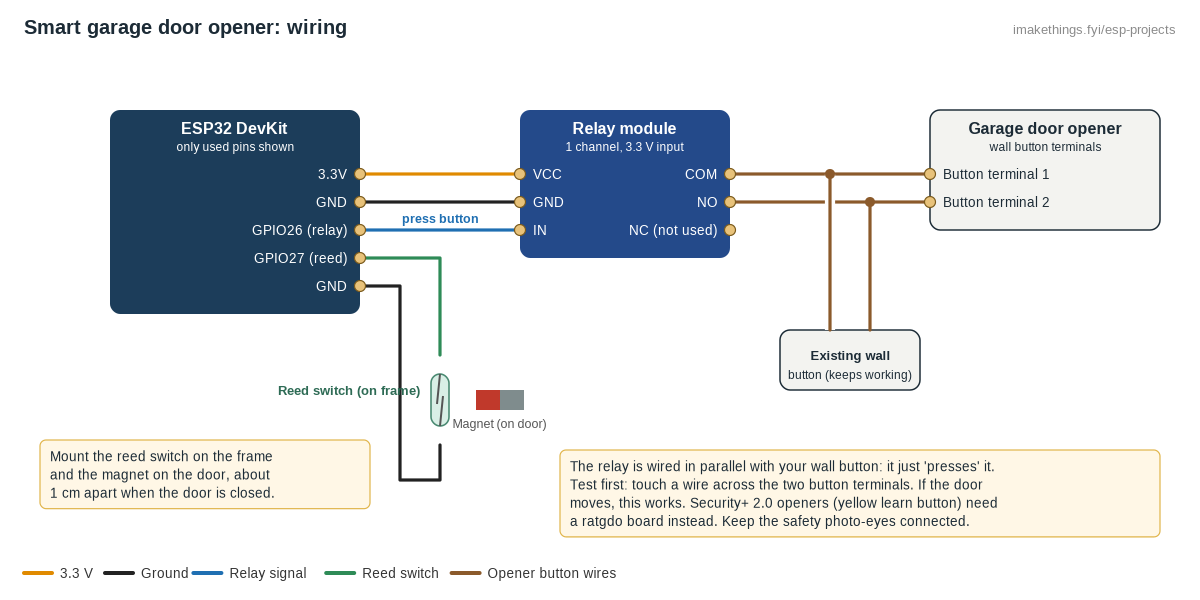
The ESPHome config
Build this config in the generator
Add this to an ESP32 config (the config generator makes the base). It defines the relay as an internal momentary switch, the reed switch as a sensor, and a cover that ties them together:
switch:
  - platform: gpio
    id: garage_relay
    pin: GPIO26
    restore_mode: ALWAYS_OFF
    internal: true
    on_turn_on:
      - delay: 500ms
      - switch.turn_off: garage_relay

binary_sensor:
  - platform: gpio
    id: door_closed
    name: "Garage door closed"
    pin:
      number: GPIO27
      mode:
        input: true
        pullup: true
      inverted: true
    filters:
      - delayed_on_off: 200ms

cover:
  - platform: template
    name: "Garage door"
    device_class: garage
    lambda: |-
      return id(door_closed).state ? COVER_CLOSED : COVER_OPEN;
    open_action:
      - if:
          condition:
            binary_sensor.is_on: door_closed
          then:
            - switch.turn_on: garage_relay
    close_action:
      - if:
          condition:
            binary_sensor.is_off: door_closed
          then:
            - switch.turn_on: garage_relay
    stop_action:
      - switch.turn_on: garage_relay
A few details matter here:
- The relay is internal and momentary. It turns itself off after half a second, just like a button press, and
ALWAYS_OFFmeans a reboot can never leave it held closed. - Open and close check the door first. Pressing "open" on an already-open door does nothing, instead of closing it.
- Stop is just another press, which is how most openers behave mid-travel.
Home Assistant automations
Left-open reminder
Trigger when Garage door has been open for 15 minutes after 9 p.m., and send a phone notification. Most people find this the most valuable part of the whole project.
Auto-close, carefully
If you add an automatic close, make it announce itself first. Commercial openers flash a light and beep before an unattended close, and you should do the same: flash a light in the garage or play a sound for at least 10 seconds before triggering the relay, and only close when nobody's presence sensor in the garage is active.
Upgrades
- Add a second reed switch at the fully-open position to tell "open" from "stuck halfway".
- Add an LD2410 presence sensor so automations know if someone is in the garage.
- Add a leak probe under the water heater if it lives in the garage — same ESP32, one more GPIO.
Frequently asked questions
Can an ESP32 control any garage door opener?
Most older openers, yes: a relay wired across the wall-button terminals acts like pressing the button. Newer Chamberlain, LiftMaster and Craftsman openers with Security+ 2.0 need a ratgdo board instead of a relay.
How do I know if my opener uses Security+ 2.0?
A yellow learn button on the opener usually means Security+ 2.0. If shorting the two wall-button terminals with a wire doesn't move the door, the relay method won't work for it.
How does Home Assistant know whether the garage door is open?
A magnetic reed switch on the door tells the ESP32 when the door is fully closed, and ESPHome reports the door as a cover in Home Assistant.
Troubleshooting
| Symptom | Likely cause and fix |
|---|---|
| Relay clicks but the door doesn't move | Your opener is probably Security+ 2.0 (yellow learn button). It needs a ratgdo board, not a relay. |
| Door moves twice or reverses | The relay pulse is too long. Keep the on time around 300–500 ms. |
| Door state is backwards | The reed switch logic is inverted. Flip the inverted option on the binary sensor. |
| Door state flickers | The magnet is too far from the switch. Mount them within about 1 cm when closed. |
| Door opened on its own after a reboot | The relay's restore mode. Set it to always off. |